Need help with SO2R setup

Installation questions, Setup, and general information not covered in the other sub-forums
Post Reply
KG2C
Posts: 4
Joined: Tue Apr 14, 2026 10:20 am

Need help with SO2R setup

Post by KG2C »

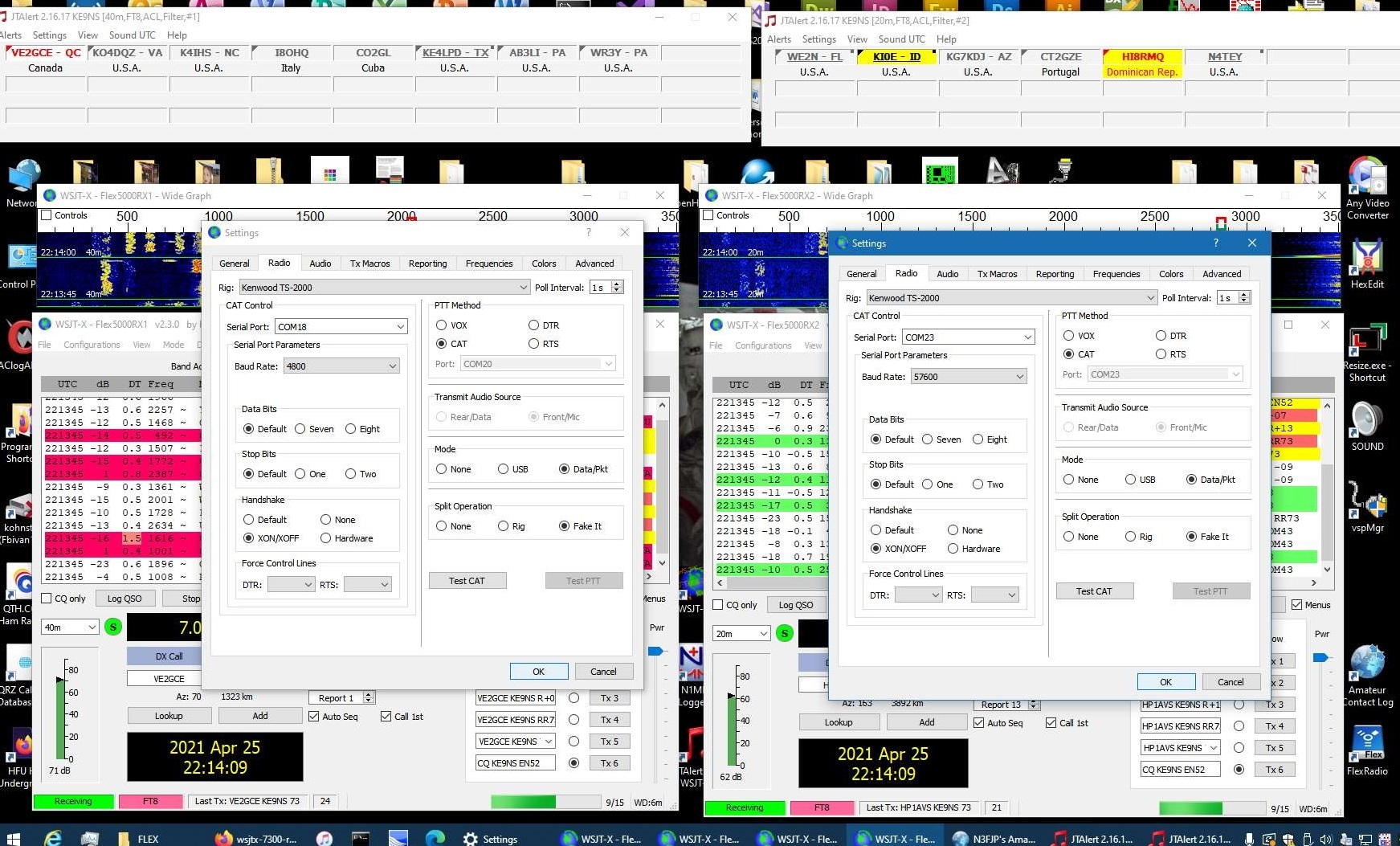
Hi, I could use some help setting up SO2R because nothing I tried worked right for WSJT-X.
I followed the video on SO2R setup with my Flex 5000A which has RX2 installed.
I tried many other configurations in addition to what was shown in the video but no matter what I did, the two instances of WSJT-X did not want to coexist and TX on their VFO without at least one of them getting an error.

Here's my setup running the latest current versions of WSJT-X and PowerSDR:
wsjt-x settings latest.PNG
wsjt-x settings latest.PNG (120.6 KiB) Viewed 29190 times
For completeness, here's my antenna settings as well.
antenna settings.PNG
antenna settings.PNG (15.36 KiB) Viewed 29190 times
And here's my PowerSDR settings (note that I use pairs 16-17 and 18-19):
powersdr settings latest.PNG.png
powersdr settings latest.PNG.png (42.36 KiB) Viewed 29190 times

The problem I am having is setting up the keying for the second instance of WSJT-X. They both connect via CAT and change frequency on their respective receivers without issue and I have the audio working just fine as well. When I test transmitting on the first instance with the TX icon in PowerSDR on VFO A, I have no problems from either instance of WSJT-X and I can keep using the first to receive and transmit and the second to just listen. Then I try transmitting with the second instance of WSJT-X and I get an error on both instances of WSJT-X whenever the second instance transmits and the TX icon shifts to the second receiver in PowerSDR.
Here's the situation after transmitting on VFO B from the second instance of WSJT-X.
wsjt-x settings latest Test PTT 2 error.PNG
wsjt-x settings latest Test PTT 2 error.PNG (136.22 KiB) Viewed 29190 times
Any help would be appreciated.

I tried different variations of the settings, specifically:
- different handshare for either or both instances of WSJT-X
- different split operation for either or both instances of WSJT-X
- switching to PowerSDR instead of Kenwood for the CAT control
- higher baud rate
- switching off SO2R mode in the PowerSDR antenna settings
User avatar
ke9ns
Site Admin
Posts: 624
Joined: Mon Nov 05, 2018 9:38 am
Location: Illinois, North West Suburbs
Contact:

Re: Need help with SO2R setup

Post by ke9ns »

In WSJT-X you need to select Split to NONE. Not Fake it. You can go to my website and CTRL F search for: WSJT-X multi-instance operation
It has all the screen shots.

Also just found out that PA19.DLL file in the folder with PowerSDR bad and causing the VAC streams to not function properly.
If your PA19.DLL is from 7/2/2010 that is the bad one. The correct one is from 6/15/2012. I corrected the file in the .328 download

Darrin
Creator of PowerSDR KE9NS v2.8, based on the Flex Radio PowerSDR v2.7.2 software.
Flex-5000, LDMOS and Titan Amps, G5RV, and Mosley TA-33 Junior
KG2C
Posts: 4
Joined: Tue Apr 14, 2026 10:20 am

Re: Need help with SO2R setup

Post by KG2C »

Thanks, Darrin. I have the PA19.dll from 2012.

I actually looked at the screenshots and video while pauing and comparing to make sure it matches what you have.
It is strange that it used to work with Split Operation = "Fake it" and now it doesn't. Both the instruction on your website and the video show it with "Fake it"
Image

If I change it like you said, I no longer get the error message, but I also still don't get automatic TX switching from VFO B back to VFO A when I transmit using the first instance of WSJT-X. The opposite works though, when I TX with the second instance of WSJT-X the TX icon moves as expected from VFO A to VFO B but then it does not ever go back to VFO A.
If I understand correctly the behavior used to be that TX switches to VFO B just while transmitting and it was supposed to go back to VFO A after, but that no longer seems to be the case and it stays on VFO B. Turning off SO2R mode in the antenna settings does not seem to have an impact on that.

I think I disregarded the Split Operation = None configuration because I had the Settings dialogs of both WSJT-X instances opened when testing Split Operation = None and if you switch back and forth between them and pressing Test CAT and Test PTT, eventually they glitch.
User avatar
ke9ns
Site Admin
Posts: 624
Joined: Mon Nov 05, 2018 9:38 am
Location: Illinois, North West Suburbs
Contact:

Re: Need help with SO2R setup

Post by ke9ns »

Split = none was in an image just under the "WSJT-X SPLIT operation:"
Not sure why Fake it no longer works.
Its been a while since I tried using SO2R with WSJT-X
But I dont recall having the TX go back to VFOA? You would not want that since you need to transmit a few times to complete a QSO?
I think I was just manually going back and forth.
But the best would be when you click on a Callsign you want to make a contact with, the software would just automatically move the TX to that side and make the QSO. So the TX only moves when it needs to move.
Creator of PowerSDR KE9NS v2.8, based on the Flex Radio PowerSDR v2.7.2 software.
Flex-5000, LDMOS and Titan Amps, G5RV, and Mosley TA-33 Junior
KG2C
Posts: 4
Joined: Tue Apr 14, 2026 10:20 am

Re: Need help with SO2R setup

Post by KG2C »

Ideally yes, it would switch TX in SO2R mode only when needed. The behavior when the feature was introduced and in the video from 4 years ago was that TX was on VFO A at all times and it switched to VFO B when the second WSJT-X instance was transmitting, then it went back. Now it is not going back and keying the radio from the first instance also does not bring it back.
You can see the old behavior from your video here. The link should start at 3:47 right before you transmit with the second instance.
User avatar
ke9ns
Site Admin
Posts: 624
Joined: Mon Nov 05, 2018 9:38 am
Location: Illinois, North West Suburbs
Contact:

Re: Need help with SO2R setup

Post by ke9ns »

I have updated and fixed the behavior of SO2R with .329.
So now when you connect both instances of WSJT-X (or any SO2R PC program) to PowerSDR, PowerSDR will now change the TX to VFOA or B depending on which CAT port requested the transmit. So now a TX command through the "RX2 VFOB" CAT port will switch TX to VFOB, and all other CAT ports will TX VFOA unless specifically commanded otherwise using CAT commands.

Darrin
Creator of PowerSDR KE9NS v2.8, based on the Flex Radio PowerSDR v2.7.2 software.
Flex-5000, LDMOS and Titan Amps, G5RV, and Mosley TA-33 Junior
KG2C
Posts: 4
Joined: Tue Apr 14, 2026 10:20 am

Re: Need help with SO2R setup

Post by KG2C »

Thank you very much for fixing it Darrin. I can confirm it works as intended now and I am enjoying dual-wielding FT8 :-)
Post Reply